

How it works
From the first question to a signed-off report in eleven steps.
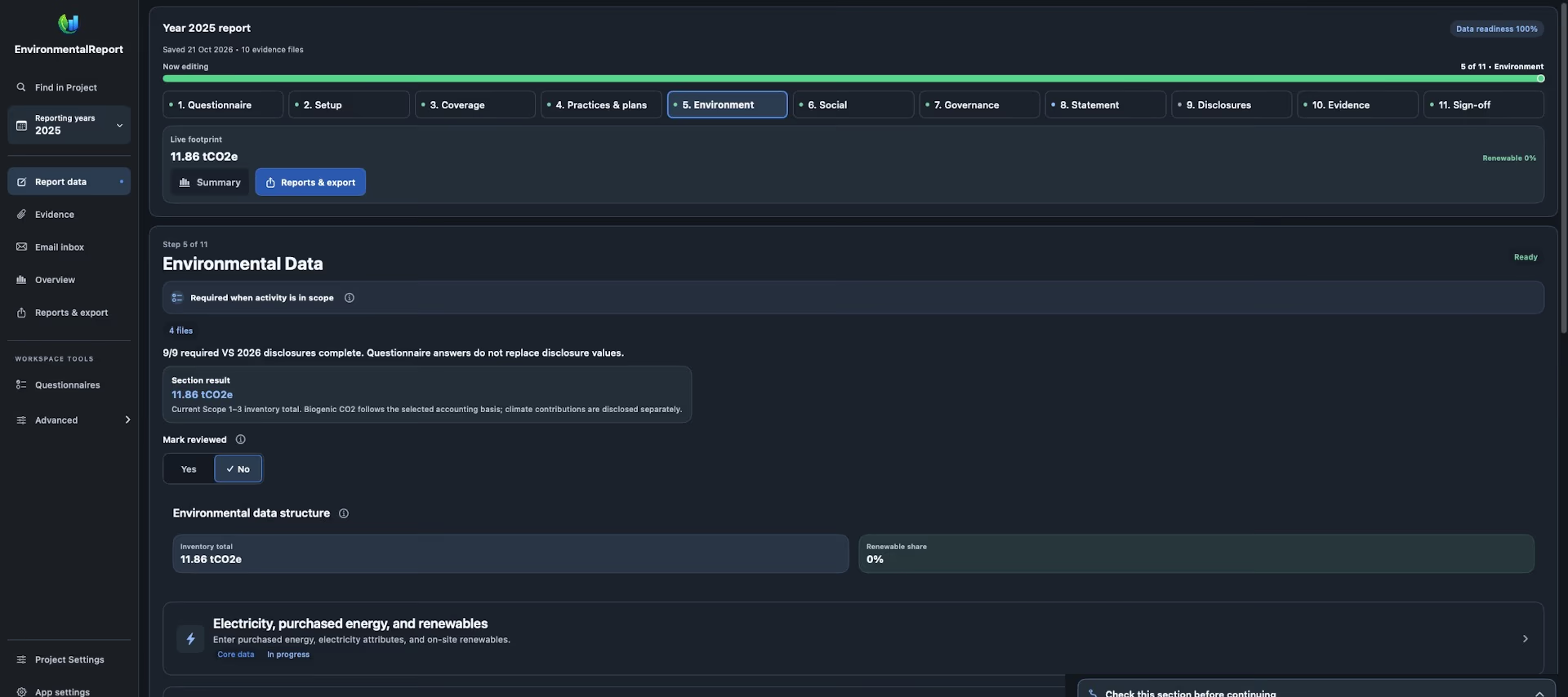
The app guides you through the whole VS 2026 report: it works out which topics apply, shares the questions among the people who know the answers and shows what is still missing before you export.
The way to your report
A questionnaire that sets the scope
Answer Yes, No or Not relevant. Company size and your answers decide which disclosures belong in the report; Open takes you straight to the right card.
Departments supply their answers
Accounting, operations, HR and management each receive only their own questions, as a fillable PDF, an Excel file or an email request.
Data with the source attached
Enter activity data in workflow cards and attach invoices, meter readings and records to the figures they support.
Readiness before export
Summary shows the results, missing information and warnings. Export becomes available once the checks are complete.
The eleven steps
- 1 Questionnaire: company size and the topics that apply
- 2 Setup: company details, reporting period, standard and option
- 3 Coverage: sites, subsidiaries, omissions and comparatives
- 4 Practices & plans: practices, policies, strategy and climate
- 5 Environment: energy, fuels, transport, water, waste and Scope 3
- 6 Social: employees, safety, training and remuneration
- 7 Governance: business conduct and governance bodies
- 8 Statement
- 9 Disclosures
- 10 Evidence: supporting documents and their review
- 11 Sign-off: management's declaration
Collect answers from the right people
Departments suggests who supplies each answer: accounting provides invoices and financial information, operations the technical activity data, HR and payroll aggregate workforce figures, and management keeps the reporting decisions. You can change every assignment and choose the coordinator.
Share the full questionnaire as a fillable PDF or Excel file, or send each department only its missing questions. Returned answers wait for your review; nothing is accepted automatically.
Email and documents in one place
Connect a mailbox, link attachments to the figures they support and prepare requests for information without leaving the project. Messages sent from the app are recorded on the device together with their attachments.
Data from your ERP or SAP
Your SAP team can deliver source records as a checksummed EDX package in the documented format. You validate it and approve the import in the app; there is no direct connection to SAP and no SAP credentials are needed.
On Mac, iPad and iPhone
Projects are kept in the app's protected storage on your devices. Switch on the encrypted workspace to pair another device and work on the same projects, and keep a separate backup. On a Mac, the Agent & CLI tools automate work under approval rules.
The client questionnaire
The full VS 2026 questionnaire of the app as a fillable PDF: every question of the standard, with the department that usually knows the answer. Fill it in on a computer or send it to a client; the completed file can then be imported into the app.
Frequently asked questions
How long does a report take?
It depends on your data. For each department the app shows the number of questions and an approximate time for the first answers and checks; collecting documents usually takes longer.
Can we try it first?
Yes. Three fictional demo companies show the app at work: a micro business on Option A, a small company with a customer request and a complete Option B example with a Scope 1–3 inventory for 2023–2025.
Does the app work offline?
Yes. Projects open locally without an internet connection and the guides are built into the app. Email and pairing devices need a connection.
Read next
- VSME reportBasic Module B1–B11, Comprehensive C1–C9 and a method beside every figure.Read more
- Evidence and Audit ReadyDocuments linked to every figure, a change log and packages for an independent review.Read more
- Guides & manualsUser manual, detailed reporting guide, ERP / SAP guide and Agent & CLI manual as PDF.Read more